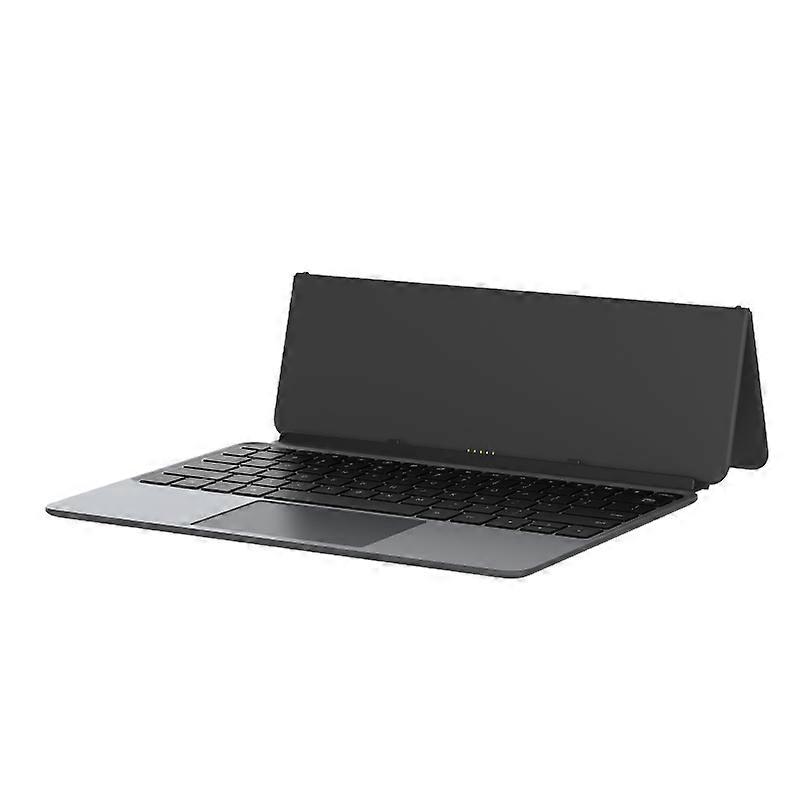
Alldocube Keyboard For Ultra Pad

119,00 €
Envio GRATUITO

Alldocube Keyboard For Ultra Pad

  • Marca: Unbranded
Vendido por:

Alldocube Keyboard For Ultra Pad

  • Marca: Unbranded

119,00 €

Economize 20,00 € (14%)

PVP

139,00 €
Em stock
Envio GRATUITO

Política de Devoluções de 14 Dias

Vendido por:

119,00 €

Economize 20,00 € (14%)

PVP

139,00 €
Em stock
Envio GRATUITO

Política de Devoluções de 14 Dias

Métodos de pagamento:

Descrição

Alldocube Keyboard For Ultra Pad

Alldocube Keyboard For Ultra Pad Important Note: If you have any questions, or if there are any problems with the package you received, please contact us through Aliexpress chatting as soon as possible. We have professional customer service staff and technical support, and we will try our best to assist you in solving the problem. Your understanding would be highly appreciated. Note: 1.Only the keyboard is included, not the tablet. 2.This keyboard is only compatible with Ultra Pad. Please purchase it according to your own needs. Keyboard instructions 1. Keyboard OTA upgrade The U1380 official keyboard is ALLDOCUBE/x27;s first keyboard that can be upgraded online via OTA. When the keyboard is pushed for an upgrade, it will automatically pop up a window to prompt that the keyboard is in the process of upgrading after being connected to the tablet. The upgrade takes approximately 1 to 2 minutes to complete. If there is an unsuccessful upgrade, the next time the keyboard is connected, it will remind you to upgrade again. After connecting the keyboard to the tablet, you can check the keyboard version in Settings - System Settings - Keyboard - Keyboard Firmware Version. This function will only be displayed after the keyboard is connected. It is not displayed normally. The current firmware version is 1.05 2. Keyboard language and layout switching Due to the different keyboard language usage habits in each country, it is necessary to make Settings before officially using the keyboard. The Settings are very simple and only require a few steps. 1. Open the tablet Settings APP and find the System Settings option. 2. System Settings > Language > Put the language you want to use first. Iii. System Settings > Keyboard > Physical Keyboard > uart_dock > Multilingual Settings > Select Your language. 4. System Settings > Keyboard > On-Screen Keyboard > Gboard > Language > Select Your Language > Select the keyboard style you want (it is very important to be consistent with the style of your keyboard film) - Go back. 5. Open a dialog box that allows input > Long press the space bar > On the page that pops up, select your language to complete the Settings. 3. Disable/Enable the touchpad function The ⌘/P key combination turns the touchpad function off/on. Pressing this key combination will prompt the tablet 4. The keyboard functions are mainly available in tablet mode. Some key combinations are not available in computer mode.
  • Marca: Unbranded
  • Categoria: Taclados
  • Estilo: Keyboard
  • Identificação da Fruugo: 458026653-965124651
  • EAN: 6942755935319

Entrega e Devoluções

Enviado dentro de 3 dias

  • STANDARD: GRÁTIS - Entrega entre terça 27 janeiro 2026–segunda 02 fevereiro 2026 - GRÁTIS

Enviamos a partir de China.

Fazemos o nosso melhor para garantir que os produtos que encomendar lhe serão entregues na totalidade e conforme as suas especificações. No entanto, se receber uma encomenda incompleta ou itens diferentes dos que encomendou, ou existir qualquer outra razão pela qual não estiver satisfeito com a sua encomenda, poderá devolver a encomenda ou quaisquer produtos incluídos na mesma, e receber um reembolso total dos itens. Ver a política de devoluções na íntegra

Detalhes de conformidade do produto

Consulte as informações de conformidade específicas para este produto descritas abaixo.

As informações a seguir são fornecidas pelo revendedor independente que vende este produto.

Fabricante:
As informações seguintes apresentam os dados de contacto do fabricante do produto em causa vendido na Fruugo.

  • Hangzhou Zichi Network Technology Co., Ltd
  • Hangzhou Zichi Network Technology Co., Ltd
  • Room 205, Building 3, No. 1866, Binxing Road
  • Changhe Street, Binjiang District
  • Hangzhou
  • China
  • 310000
  • 18758862577@163.com
  • 15158876167

Pessoa responsável na UE:
As informações seguintes apresentam os dados de contacto da pessoa responsável na UE. A pessoa responsável é o operador económico designado, sedeado na UE, incumbido das obrigações de conformidade relativas ao produto em causa vendido na União Europeia.

  • Universal International business SARL
  • Universal International business SARL
  • 254 Rue Vendome 69003 Lyon
  • Lyon
  • France
  • 69003
  • Leroy.Holliana@outlook.com
  • 33773332462